Registering New Athletes (ANI)
Club administrators in Northern Ireland are responsible for using OpenTrack to add members to their club, and licensing them with Athletics Northern Ireland where appropriate.
Access
To add a new athlete to your club, you need Club Administrator permissions. To check whether you have these permissions, you can go to the Officials tab of your club page and check to see if your name is there.
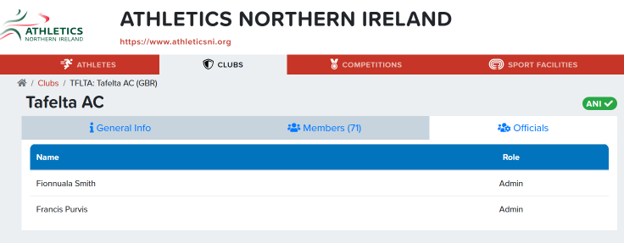
If you do not show as an Admin in the officials list for your club, then you will need to request access from an existing Admin, or a member of ANI staff.
Adding Athlete(s)
Once you have access, you can add athletes in your club's Members tab. Please ensure you are logged in.
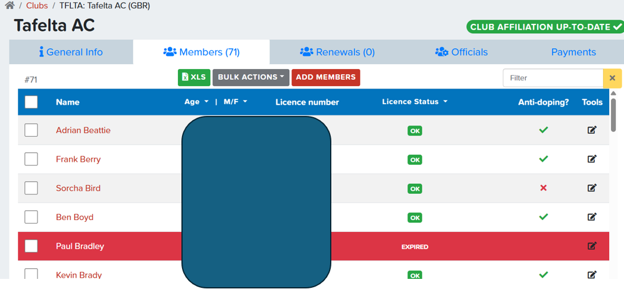
Click ADD MEMBERS to go to a grid that will allow you to add multiple members.
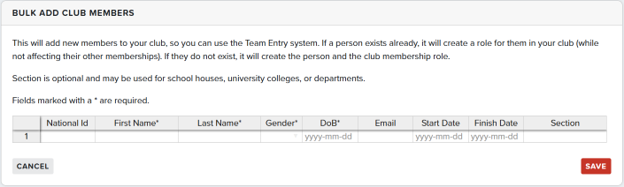
Complete the grid with the new athletes you wish to add to your club, ensuring your get their details correct, and click SAVE. This process is the same whether your athlete is completely new, or just transferring to your club.
Your athlete(s) will then be added to your club's Members tab.
Licencing Athlete(s)
Once your athletes are listed in the Members tab, they are ready for licencing.
Locate them in the list, either by scrolling or searching for their name using the search box.
Once you have found the athlete(s) you wish to licence, click the checkbox to the left of their name, then click BULK ACTIONS and choose 'Renew athletes’s federation membership'.
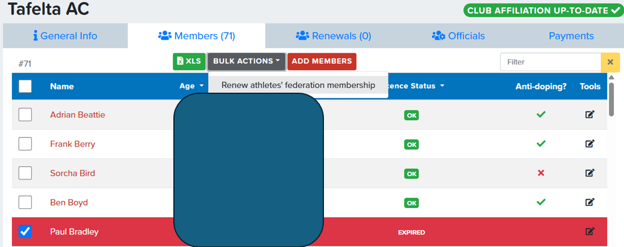
The athlete(s) will then be moved into the Renewals tab.
Paying for Athlete(s)
You can pay for all athletes in the Renewals tab, or just some.
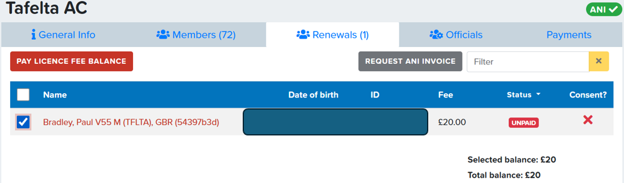
Click the checkbox for each athlete you wish to pay for, and then choose your payment method:
- Credit card via PAY LICENCE FEE BALANCE
- Invoice via REQUEST ANI INVOICE